Security Preferences
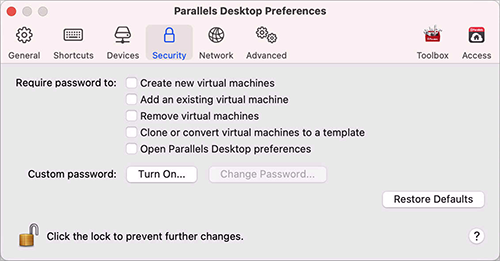
Use Security Preferences to set password requirements.
To open these preferences, choose Parallels Desktop > Preferences , then click Security .
|
Option |
Description |
|
Require password to |
In this section, you can select the actions for which Parallels Desktop will require an administrator password. Note: Open Parallels Desktop preferences is available in Parallels Desktop for Mac Pro and Business Editions only. |
|
Custom password (available in Parallels Desktop for Mac Pro and Business Editions only) |
You can create a custom password to restrict the above operations. Select the operations you want to protect with this password, click Turn On and specify the password. To change or turn off the password, click Change Password or Turn Off . |
 Top of page
|