Use Host-Only Network Settings
Parallels Desktop provides a closed network that is accessible only to macOS and Windows. macOS is connected to this network via the Parallels Host-Only Networking adapter automatically created on your Mac during the Parallels Desktop installation. The addresses for Windows are provided by the Parallels DHCP server.
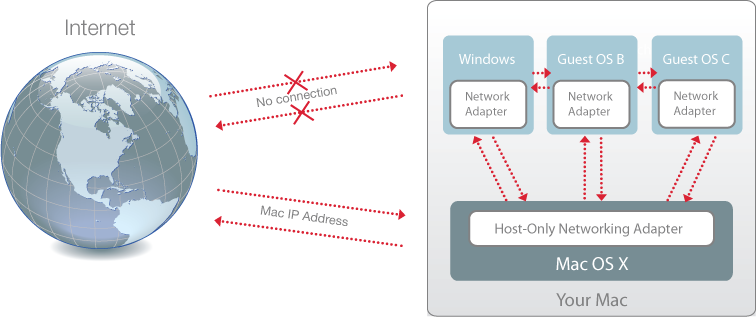
To configure Windows to use Host-Only Networking:
-
Do one of the following:
-
Click the Parallels icon
 in the menu bar and choose
Configure.
in the menu bar and choose
Configure.
- Click Actions in the Parallels Desktop menu bar at the top of the screen and choose Configure .
-
Click the Parallels icon
- Click Hardware and then click Network .
-
In the
Network
pane, make sure the
Host-Only Network
option is selected.
Note: In the MAC address field, you can change the MAC address currently assigned to Windows. MAC addresses are automatically generated when you first set up Windows. However, you can modify the default MAC address by typing another value in the MAC address field or clicking the Generate button. When entering a new MAC address, make sure that it is unique within your network.
For the information about troubleshooting networking problems, refer to the Parallels knowledge base available at the Parallels website.
 Top of page
|